Understanding the Cluster
An overview of the Hazel Linux cluster: architecture, terminology, and how to use it.
What is a Linux Cluster?
Hazel is a collection of commodity compute servers (primarily Lenovo two-socket servers with Intel Xeon processors) with a few serving as login or service nodes and most serving as compute nodes. These servers are connected by high-speed networks and share common storage, allowing them to work together as a single system for running computational workloads.
Cluster Architecture
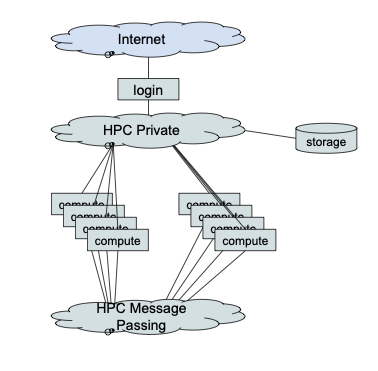
Node Types
Login Nodes
The login nodes are accessible from the broader network (Internet or campus network) and provide the entry point to the cluster. Login nodes are shared with all users and are intended only for:
- Editing files and scripts
- Compiling code
- Submitting and monitoring batch jobs
No resource-intensive processes may be run on login nodes. This is a shared resource subject to the Acceptable Use Policy.
Compute Nodes
Compute nodes are where jobs are executed. They should not be accessed directly. Jobs are submitted to the scheduler from the login node, and the scheduler allocates compute nodes and runs jobs there.
Compute nodes have two network connections (HPC private network and HPC message passing network) but do not have a direct connection to any external network. Access to locations outside the cluster must be specifically configured via a proxy server.
Cluster Networks
HPC Private Network
The HPC private network connects all the cluster nodes together. It is primarily used for job control and access to storage. In Hazel this is an Ethernet network with 100Gbps Ethernet core and 25Gbps connections to nodes.
HPC Message Passing Network
The HPC message passing network is dedicated to communication between job tasks, such as distributed memory parallel jobs using Message Passing Interface (MPI) communication. In Hazel this is an InfiniBand network with multiple 200Gbps (high data rate - HDR) links forming the core and 100Gbps (enhanced data rate - EDR) links to nodes.
Storage Overview
There are several different storage areas on Hazel, each with different capacities and intended purposes. For full details, see the Storage documentation.
| Location | Path | Purpose | Backed Up? |
|---|---|---|---|
| Home Directory | /home/user_name | Scripts, small applications, and temporary files needed by the scheduling system. 15 GB and 10K file quota. | Yes (daily backups and snapshots) |
| Scratch Directory | /share/group_name/user_name | Data for running jobs and job results. 20 TB and 1M file quota per project. | No. Files not accessed for 30 days are automatically deleted. |
| Application Directory | /usr/local/usrapps/group_name | User-installed software. 100 GB and 250K files default quota. | Yes |
| Research Storage | (varies) | Long-term research data accessible from all Hazel nodes. | Yes |
Learn about transferring files to and from the cluster.
Authorization and Access
Accounts must be authorized to connect to the Hazel Linux Cluster. Authorization is organized by projects, which facilitate file sharing between project members, cluster usage accounting, and various resource limits and quotas.
Research Projects
Research projects are owned by a faculty member. Project members are managed by the faculty member using a self-service web application: https://research.oit.ncsu.edu.
Course Projects
Course instructors may request a course project with access for students enrolled in the course by sending email to help@ncsu.edu.
For full details on obtaining access, see the Getting HPC Access page.
Connecting to Hazel
Web Browser (Open OnDemand)
A web-based interface, Open OnDemand, is available to all authorized Hazel accounts regardless of your institution. Use your web browser to connect to https://servood.hpc.ncsu.edu. Open OnDemand provides a web-based terminal session on a Hazel login node, along with additional functions and applications.
See Open OnDemand documentation for more details.
Terminal Window (SSH)
From a terminal window on Linux, Mac, or Windows you can connect to a shared Hazel login node using the secure shell command: ssh user_name@login.hpc.ncsu.edu where "user_name" is replaced by your authorized Hazel user name.
See the full login documentation for detailed instructions.
Applications on Hazel
HPC Staff-Maintained Applications
There is a set of applications maintained on Hazel by the HPC staff. Generally, to use one of these applications you will use the module command to set up your environment, create a job script to execute the application, and then submit the job script to the scheduling system.
User-Installed Applications
Users can install their own applications in their project's application directory. The primary tools recommended for installing applications are Conda and Apptainer containers.
See the software installation FAQ for general guidance.
The Job Scheduler
Applications must not be executed directly on the login nodes. Anything that uses significant CPU or memory resources must be run via the job scheduler.
The job scheduler manages all compute resources on the cluster. You submit a job script describing what to run and what resources you need, and the scheduler queues your job, allocates compute nodes when resources are available, and runs your job there.
Hazel uses the Slurm workload manager for scheduling jobs. Key scheduler concepts include:
- Batch jobs: Scripts submitted to the scheduler that run unattended on compute nodes
- Interactive jobs: Sessions on compute nodes for testing and debugging
- Partitions: Groups of nodes organized by hardware type (CPU, GPU) and access level
- QOS (Quality of Service): Controls job priority and resource limits
- Fairshare: Ensures equitable access to resources across all users over time
Basic Terminology
| Term | Definition |
|---|---|
| Node | An individual server (computer) in the cluster |
| Core | A processing unit within a CPU; each node has multiple cores |
| Job | A unit of work submitted to the scheduler to run on compute nodes |
| Batch script | A text file containing scheduler directives and commands for your job |
| Partition | A group of nodes with shared characteristics (e.g., CPU nodes, GPU nodes) |
| Module | A package that configures your environment to use a specific software application |
| MPI | Message Passing Interface - a standard for parallel programs that communicate across nodes |
| OpenMP | A parallel programming model for shared-memory (single-node) parallelism using threads |
| GPU | Graphics Processing Unit - specialized hardware for parallel computation, used for machine learning and scientific computing |
| NUMA | Non-Uniform Memory Access - a memory architecture where access time depends on memory location relative to a processor |
| InfiniBand | A high-speed network interconnect used for communication between nodes in parallel jobs |
| Scratch | High-performance temporary storage for job data; not backed up |